
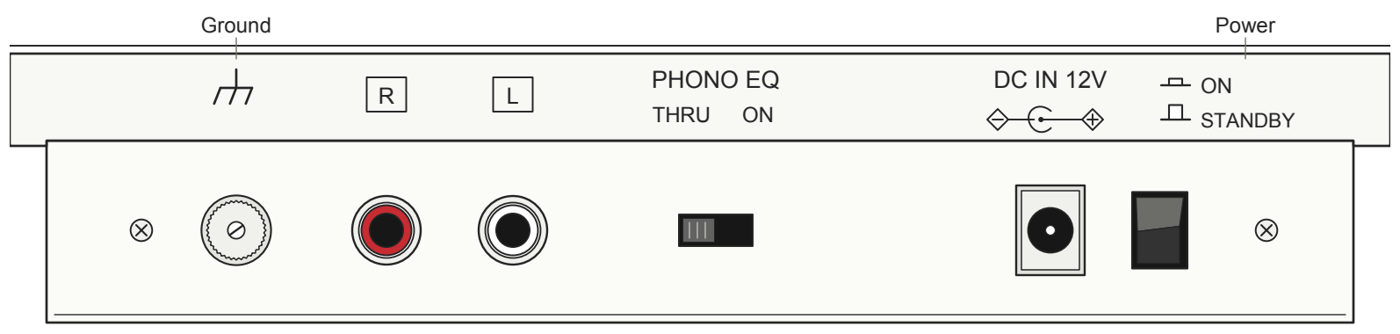
Use PHONO EQ ON for a LINE or AUX input and PHONO EQ THRU for an MM PHONO input or external moving-magnet phono preamp. A mismatch can make playback very quiet or unusually loud and distorted. Turn the volume down and switch off the connected equipment before changing the switch or cables.
Find the PHONO EQ switch and ground terminal
On the Miracord 40 (MRC401) rear panel, the ground terminal is to the left of the red and white RCA outputs. The PHONO EQ switch is to their right, before DC IN and the separate power switch.
| Where the RCA cable goes | PHONO EQ |
|---|---|
| LINE or AUX on an amp, receiver, or powered speakers | ON |
| MM PHONO or an external MM phono preamp | THRU |
With an external phono preamp, connect its output to LINE or AUX on your listening system.
No sound or very quiet playback
- Confirm that the amplifier, receiver, or powered speakers are on, the correct input is selected, and mute is off. If you use passive speakers, connect them through an amplifier.
- Check that the RCA plugs are fully seated at both ends, with red on R and white on L.
- If you’re connected to LINE or AUX, set PHONO EQ to ON. If you’re connected to an MM PHONO input or external MM phono preamp, use THRU.
- Switch your equipment back on and test at low volume.
Unusually loud or distorted playback
Reduce the volume. If PHONO EQ is ON and you’re plugged into an MM PHONO input, set it to THRU. To use the built-in preamp, keep the switch at ON and connect to LINE or AUX. If distortion continues, check the stylus for dust or damage and verify the tracking force.
Hum or buzzing
- Check the RCA plugs and keep the signal cable away from power adapters and mains cables.
- With PHONO EQ ON: The built-in preamp normally works without a separate ground lead. If your amplifier or receiver has a GND terminal, connect the turntable’s ground lead to it.
- With PHONO EQ THRU: Connect the ground lead to the receiving MM phono stage’s GND terminal when it has one.
Never connect the ground lead to a wall outlet or remove a protective earth connection.