
Before you start
This guide explains how to replace the complete rechargeable battery pack in your ELAC NAVA100. Read the safety notes and confirm replacement-pack compatibility before opening the battery compartment. If you are unsure about any step, contact ELAC Product Support before proceeding.
Important: If the battery is swollen, leaking or hot, stop and contact ELAC support. Do not attempt this replacement procedure on a damaged battery.
- Switch the speaker off and unplug the USB-C charging cable.
- Work on a dry, non-metallic surface, away from children.
- Never puncture, crush, heat or short-circuit the battery.
- Replace the whole pack. Never open the pack or replace individual cells.
- Do not modify the wiring or connector.
What you will need
- A small Phillips screwdriver (#1).
- A soft cloth to protect the speaker.
- A small tray for the four screws.
- A replacement battery pack confirmed compatible with NAVA100.
- Insulating tape for the old battery plug.
- A USB-C cable and a 5 V DC, 2 A USB power supply for charging afterward.
Original battery specifications
The original NAVA100 battery pack has the following specifications:
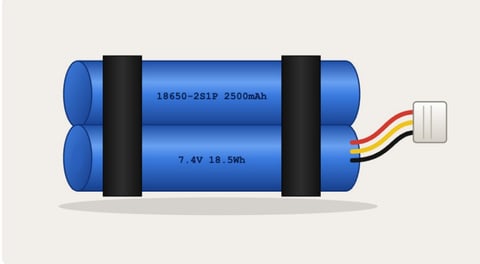
- Type: Rechargeable lithium-ion pack with two 18650 cells in series (2S1P).
- Nominal voltage: 7.4 V.
- Capacity: 2500 mAh / 18.5 Wh.
- Connection: 3-wire lead on the original pack.
- Pack marking: 18650-2S1P 2500mAh 7.4V 18.5Wh.
Check compatibility first: Matching voltage and capacity alone does not establish compatibility. Use a replacement pack confirmed compatible with NAVA100. Do not modify its wiring or connector. If compatibility is uncertain, contact ELAC Product Support before installation.
Remove the old battery
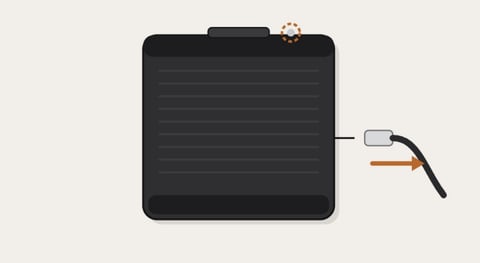
1. Power off and unplug
Switch the speaker off and disconnect the USB-C charging cable.
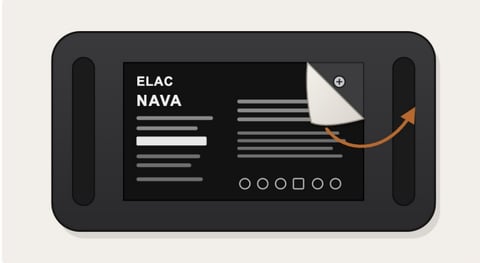
2. Peel back the label
Turn the speaker upside down on a soft cloth. Peel the label from one corner and keep it: it carries your serial number.
3. Remove the four screws
Turn each corner screw counter-clockwise and put all four screws in the tray.
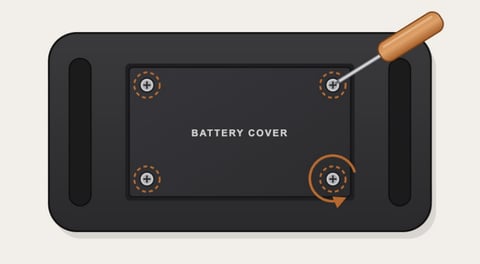
4. Lift off the cover
Lift the cover straight up. The battery pack sits underneath, with its plug at one end.
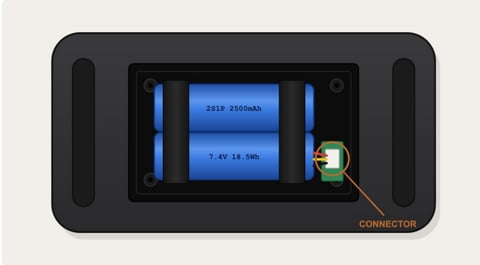
5. Unplug the battery
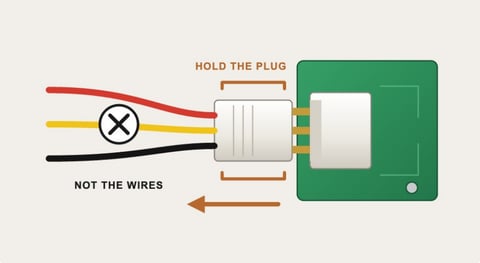
Hold the white plug, not the wires, and pull it straight out of its socket. If it does not release easily, stop and contact ELAC support rather than forcing it.
6. Lift the battery out
Lift the pack out by its foam pads. Cover the old battery plug with insulating tape immediately. Keep metal objects away from the plug.
Fit the new battery
7. Connect the new battery
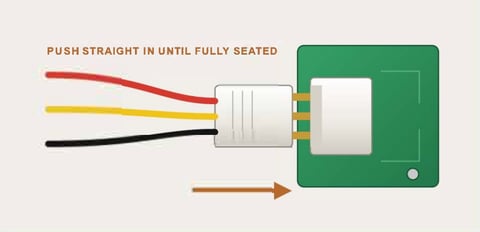
Use a replacement pack confirmed compatible with NAVA100. Push its plug straight into the socket until fully seated. It fits one way only; never force it.
8. Seat the pack
Lay the pack in the compartment in the same orientation as the old one. Route the wires so the cover will not pinch them.
9. Refit the battery cover
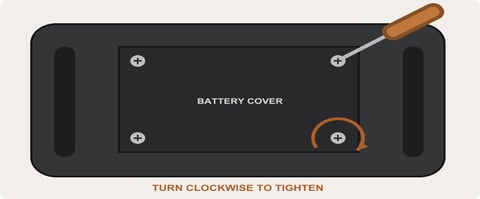
Refit the cover and the four screws. Turn clockwise until snug; do not overtighten. Smooth the original label back into place.
10. Charge and test
Connect the USB-C cable to a 5 V DC, 2 A USB power supply and charge fully. Switch on and connect over Bluetooth to check playback.
Recycle the old battery
Do not put the battery in household waste. Keep the plug covered with insulating tape and use an appropriate battery collection point. Check local disposal requirements. Do not burn, crush or open the battery. Contact ELAC support before shipping a battery.
Need help?
If you are unsure about replacement compatibility or any part of the procedure, contact ELAC Product Support before proceeding.
For help reconnecting after replacement, see How to Connect NAVA100 to Bluetooth.